Graduate project · Student guide
Technical Support Training: Student Guide
Call scripts and practice activities for gathering customer, system, and error information on a technical support call.
What it is: The learner’s half of a two-module course I designed as a graduate project: training for the phone support staff of a hypothetical assistive technology vendor. Learners follow word-for-word call scripts, practice each step on a computer from the customer’s side, then take mock calls from an actor.
See also: the instructor guide, with lesson plans, objectives, and scoring rubrics for each mock call.
Overview of lesson sequence
- Module 1: Gathering information from the customer over the phone
- Module 2: Gathering information about the error
- Customer calls
- Module 1: Elicit personal and system information from the customer
Can the customer provide an ID?
- Yes Module 1, Lesson 1: Gather and verify personal and system information from the customer file
- No Module 1, Lesson 2: Gather and verify personal and system information from the customer
Customer doesn’t know the display adapter information? Module 1, Lesson 3: Gather information about the display adapter
- Module 2: Elicit information about the problem
Module 2, Lesson 1: Listen for potential causes of error Complete information not offered voluntarily? Module 2, Lesson 2: Question the customer for potential causes of error
- End of lesson
Introduction
This instruction consists of two modules, encompassing 5 lessons. The lessons will present scripts that you can follow to gather personal and system information from the customer as well as information regarding the problems being encountered and the applications causing those problems. The lesson will demonstrate professional phone etiquette and allow you to participate in several mock phone calls to develop mastery. With the information gained through these modules, you will then be able to determine the proper sequence for troubleshooting the problem or deciding if the problem needs to be sent to higher level technical support personnel.
This student guide will direct you through much of the training. You will also be engaged in discussions and provided demonstrations of the various errors that may be encountered. Subsequently, you will utilize a computer to practice the steps from the perspective of the customer. Then you will have an opportunity to practice interacting with an actor (customer) over the phone.
While each lesson is designed to last only about 10 or 15 minutes, the actual amount of time will vary depending on your familiarity with troubleshooting; the number of people that are able to take the training at any given time; and the number of questions in each session. To participate in these lessons, you will be provided with a writing utensil, paper, and the student guide on CD-ROM. The employer will provide you with these materials at no charge.
Module 1: Gathering information from the customer over the phone
Lesson 1: Eliciting contact and system information from the customer using a system ID
Lesson overview
- Lesson goal
- Learn to use the customer ID to locate the appropriate information in the system.
- Purpose
- This lesson is designed to instruct you in accessing customer information as quickly as possible, without having to ask the customer to provide personal information unless absolutely necessary.
- Synopsis
- The lesson will explain the use and location of the ATVendor system ID, then demonstrate how to find the customer’s file on the system based on this ID. You will be able to practice by participating in a mock phone call.
Following are some very specific scripts to guide you in getting information about the customer and the computer they are using, provided that the customer is able to find their ATVendor ID. All computers shipped from ATVendor have an ID associated with them. Using this ID is the easiest way to get comprehensive information about the customer and the computer. Attempt to have the customer provide you with this ID before trying other means. After getting the ID, verify that you have found the correct file and that the information is current. Use the following guide:
Have the customer provide the ID.
Say: “Would you please read the ATVendor ID. It is located on the Start Menu as well as on the side of the computer.”
Get all the customer and system information based on this ID.
Note: Each customer has their own PDF file containing all documents related to their system. The file will bear the name of the ID on their system. It is located in the X folder. These files contain the customer’s name, e-mail, phone number, operating system, display adapter, and pre-installed software.
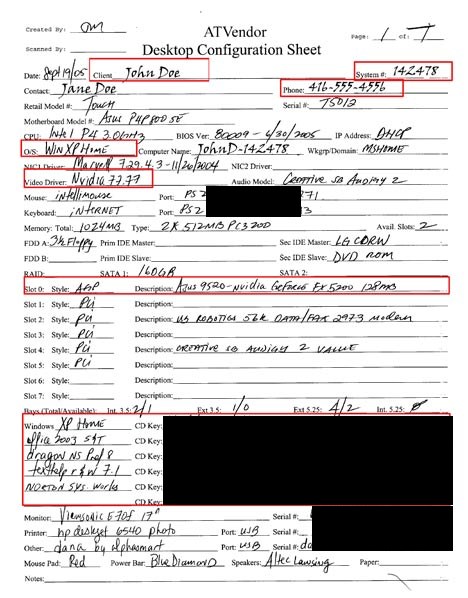
Figure 1. A sample customer configuration sheet, with the fields you need highlighted. Software keys and serial numbers are blacked out in this web version. Verify that this information is correct.
In order to troubleshoot the system, you need to have accurate and current information.
Say: “I have your e-mail address as [E-MAIL ADDRESS] and your phone number as [PHONE NUMBER]; is this correct?”
If the number is correct, go to Module 2, Lesson 1; otherwise, go to Lesson 2.
Module 1: Gathering information from the customer over the phone
Lesson 2: Eliciting contact and system information from the customer who does not have a system ID
Lesson overview
- Lesson goal
- To instruct you in how to use professional phone etiquette to gather contact and system information from a customer when they do not provide a system ID.
- Purpose
- This lesson is designed to direct you to appropriately request personal and system information from the customer when the customer file cannot provide that information.
- Synopsis
- The lesson will explain why it is necessary to gather specific information from the customer. This information includes the customer’s name, phone number, e-mail address, operating system, and display adapter. You will have the opportunity to practice gathering this information by participating in a mock phone call.
If the customer is unable to locate their ID and cannot provide enough information so that you can locate their file, you will need to get basic contact information and verify that it is correct. By gathering basic contact information, ATVendor is able to keep a record of who is calling and how often. It helps ATVendor to determine whether or not specific systems are experiencing an unusual number of problems that may be indicative of issues with the configuration. It also allows ATVendor to follow up on calls to determine customer satisfaction. This information is necessary if the call is passed on to a higher level technical support or if the call has to be returned. Below is specific wording that will help you to make sure that you have all the information you will need.
Follow these steps to get contact information:
Ask the customer for his or her name.
Say: “May I have your name?”
Ask the customer for his or her phone number.
Say: “And may I have your phone number?”
Ask the customer for his or her e-mail address.
Say: “I will also need your email address.”
Ask the customer for the operating system.
Say: “What operating system are you using?”
If the customer is unable to determine the operating system, use the following procedure:
“To determine which version of Microsoft Windows you are running, do the following:
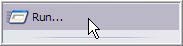
- On the taskbar at the bottom of your screen, click Start, and then click Run.
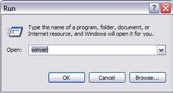
- In the Run dialog box, type: winver.
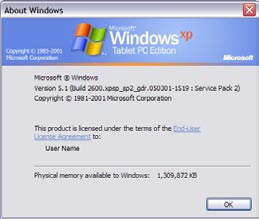
- Click OK. A dialog box displays the version that you are running. Please give me that information.”
Ask the customer for the brand and model of the computer.
Say: “What is the brand of computer you are using?”
Ask the customer for the brand and model of the video card/display adapter.
Say: “What is the brand and model of your display adapter?”
If the customer does not know, or cannot determine this information, go to Lesson 3.
Practice
On your computer, try to determine the operating system using the method outlined above. When you are on the phone with a customer, follow the scripts above, making sure to get the customer’s name, phone number, e-mail address, operating system, and display adapter.
Module 1: Gathering information from the customer over the phone
Lesson 3: Eliciting the brand and model of the display adapter from the customer
Lesson overview
- Lesson goal
- To discuss the use of professional phone etiquette to gather display adapter information in the most efficient manner possible when a customer is unable to provide this information and to indicate why it is important to gather that information.
- Purpose
- This lesson is designed to direct you to appropriately request display adapter information from the customer when the customer’s file cannot provide that information.
- Synopsis
- This lesson will explain why it is important to gather information about the display adapter as well as the proper steps to get this information as efficiently as possible. You will have a chance to practice gathering this information by participating in a mock phone call.
You were asked previously to have the customer provide the brand and model of the display adapter. Many customers will be unable to provide this information; therefore we will explore the proper steps to gather this information. Adaptive technologies, such as screen readers and magnifiers locate the display driver, get the information needed for it, then pass the sometimes modified Display Driver Interface (DDI) calls to the original display driver. These technologies may be compatible with some adapters, but not others. It is therefore important to gather information about the display adapter.
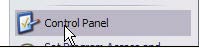
Have the customer go to the control panel.
Say: “In the Windows Start menu, select Control Panel.”
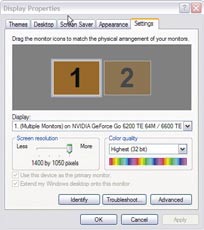
Have the customer open the display properties window.
Say: “In the Control Panel window, double-click Display.”

Have the customer select the Advanced button.
Say: “In the Display Properties dialog box, select the Settings tab, then click the Advanced button.”
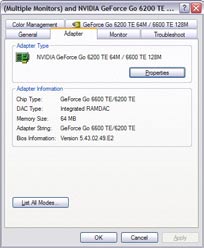
Have the customer select the Adapter tab.
Say: “A new dialog will appear that contains your video adapter settings. In this dialog, select the Adapter tab.”
Have the customer read the name and model of the video adapter.
Say: “The name and model of your video adapter appears in the box labeled Adapter Type. Would you please read this to me.”
Practice
On your computer, follow the steps here to determine the display adapter brand and model and to become familiar with what the customer will be experiencing when following these steps. As part of a phone call with a customer, you will be required to gather display adapter information from the customer and determine if you need to walk the customer through finding information about the display adapter.
Module 1 assessment
Module 2: Gathering information about the error
Lesson 1: Listening for potential causes of error
Lesson overview
- Lesson goal
- To provide information about the types of content you need to listen for when speaking to a customer.
- Purpose
- The lesson is designed to instruct students in the types of information they will need to listen for as the customer describes the problem. This will help promote good customer relations and save time and frustration generated when the customer is asked to repeat information.
- Synopsis
- This lesson discusses the things to listen for as the customer describes the problem: the program generating the error, the frequency of the error and the circumstances surrounding the error.
Here, we will discuss techniques for listening for the potential causes of the error. Gathering the necessary information through listening can save you a lot of time. It also prevents the customer from having to repeat information; they will therefore be less frustrated by the process.
Listen for the program generating the error.
The customer will often give some indication of the program that caused the error. Listen for any hint of what program they were using when the error occurred. The error may be related to one program or could be a conflict between two or more programs. If the customer does not provide sufficient information about the program that is causing the error, get this information as indicated in Lesson 2.
Listen for what happened when the error occurred.
Errors may occur consistently or may appear intermittently. Try to determine if the customer has witnessed a pattern, that is, have they noticed any link between what they are doing and what is causing the error. If the customer does not provide this information, get this information as indicated in Lesson 2.
Listen for how many times the error has occurred.
It will be helpful to know if this is the first time the error has occurred or if it has been ongoing and the customer has only now called for support. This will also give you some insight into the customer’s attitude. If the problem has been ongoing, the customer may already be frustrated, and it will be important for you to focus on being positive and patient. If the customer does not provide enough information about the error, gather additional information by following the steps in Lesson 2.
Module 2: Gathering information about the error
Lesson 2: Questioning the customer for details surrounding the error
Lesson overview
- Lesson goal
- To discuss the use of professional etiquette when gathering information from the customer regarding the errors with an application.
- Purpose
- This lesson is designed to instruct the learner in the use of professional etiquette when working with a customer to determine the specifics of an error.
- Synopsis
- In this lesson you will use a script to gather error details, such as the name of the program generating the error, the version of the program, the context of the error, and the specific message received. You will then have an opportunity to follow a script to practice using professional etiquette to gather this information.
If the customer does not provide the necessary information initially, you will have to ask several questions to determine what application or combination of applications is responsible for the error. There are specific questions you can ask to determine the cause of the problem, but you may need to ask more specific questions based on the responses from the customer. These are the questions you must ask to every customer.
Discover the name of the program that caused the error.
Say: “What program were you using when the error occurred? What other programs were running at the time the error occurred?”
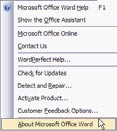
Discover the version of the program that caused the error.
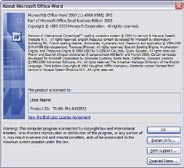
Say: “What version of [the program in question] are you using? This information is available by choosing About in the Help menu of [the program in question].”
Discover the context of the error.
Say: “What were you doing when the error occurred?”
Discover any error messages that were reported.
Say: “What error message was reported?”
Practice
During a phone call with the customer, follow the script and then ask any other pertinent questions you feel are necessary. It is important to always be polite and respectful.